Posts

Showing posts with the label arduino codes

How to make voltmeter using Arduino
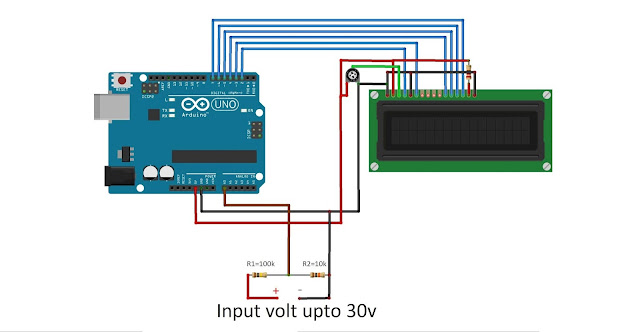
Image
ABOUT THIS PROJECT About This project is about the simple hack of voltmeter by Arduino. The main reason behind making this is from my personal experience, when I was performing one experiment in the lab, I could not find a voltmeter so I made this hack to fulfill my requirement and also I think it will help others too. Good project for beginners which uses basic concepts, yet a power full tool. While running the code, you can find the output on the serial monitor. Calculating Voltage Formula for calculating voltage: Vout = (Val * 5.0 ) / 1024.00 ; Here in these formula Val is the value that is read by Arduino as analog input, which is further multiplied by the voltage that is been supplied by Arduino and thus to get the Vout it is divided by the cycle of time that is covered after every bit to get the value. Vin = Vout / ( R2 / R1 + R2 ) By this formula we can find the Vin that will be around 0, which indirectly means we are creating ground. NOTE: Here there is no restriction on usi...

teri meri songs tone using arduino with circuit diagram and code

Image
Teri meri Arduino code. Arduino code,  copy and pest // Teri Meri Meri Teri Prem Kahani by "Future Technology RC" int BuzzerPin = 9; //buzzer is connected to Pin 9 of the Board. int LEDPin = 10; int length = 100; // the number of notes char notes[] = "DAGAFGAFGAGFEDEDC DEFEFEGAGFEDD DAGAFGAFGAGFEDEDC DEFEFEGAGFEDD DAGAFGAFGAGFEDEDC DEFEFEGAGFEDD "; // a space represents a rest int beats[] = { 2,1,2,1,2,1,2,1,2,2,1,1,2,2,1,1,1,1,2,1,2,1,1,2,2,2,1,2,2,2,1,1,2,2,1,2,2,2,1,2,2,2,2,1,2,2,1,2,1,1,2,1,2,1,2,2,1,2,2,2,1,2,1,1,2,1,2,1,2,1,2,2,1,1,2,2,1,1,1,2,1,2,1,1,2,2,2,1,2,2,2,1,2,2,2,1,2,2,2,1, };//Duration of each note int tempo = 300; //Change song speed here void playTone(int tone, int duration) {  //creating a square wave for the given duration   for (long i = 0; i < duration * 1000L; i += tone * 2) {     digitalWrite(BuzzerPin, HIGH);      digitalWrite(LEDPin, HIGH);     delayMicroseconds(tone);   ...